
General Knowledge
AI

Most "system problems" aren't system problems. A six-question framework for finding where the real issue sits — before you spend money on the wrong fix.
I hear some version of this every week: "The system can't do it." Sometimes that's true. More often, the system can do it — but nobody's using it, nobody was trained on it, or nobody checked.
The result is always the same. Someone raises a complaint, it gets logged as a system deficiency, and before long the business is shopping for new software to fix a problem that was never about the software.
I've watched companies invest heavy time and money replacing systems because of problems that would have been solved by a half-day internal training session. I've also watched companies tolerate broken systems for years because nobody had a structured way to separate "this is genuinely broken" from "this is just how we've always done it."
Both mistakes are expensive. One costs money. The other costs time, morale, and margin.
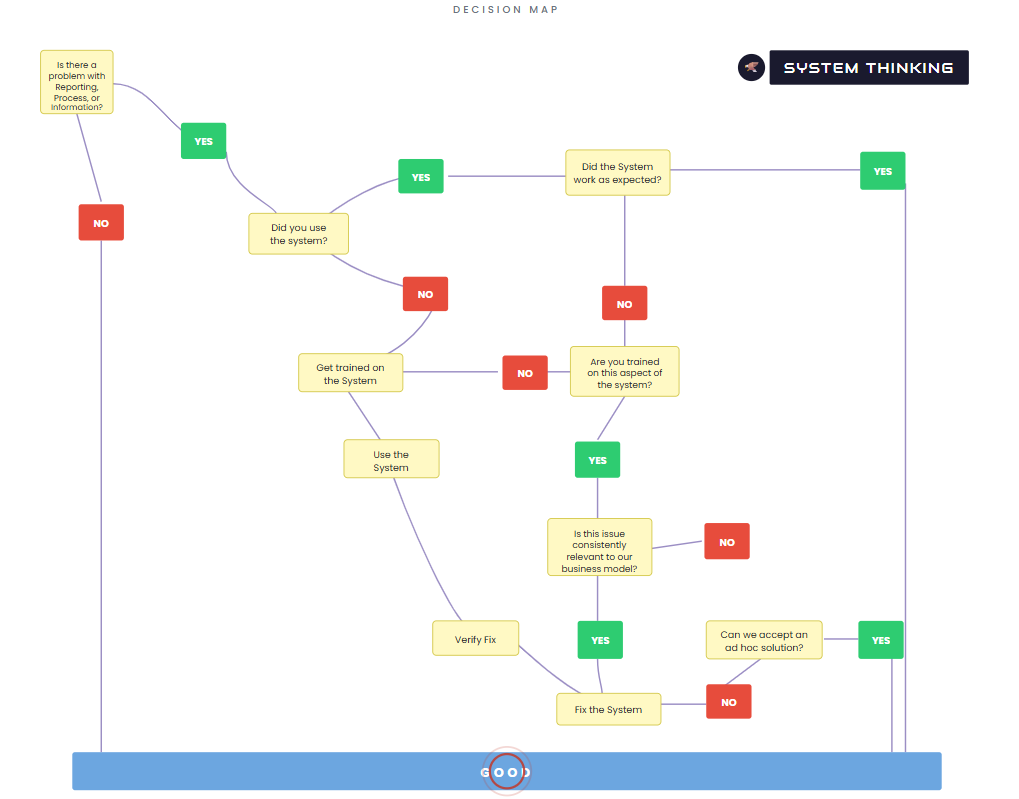
System Thinking is six questions, asked in order. Each question narrows the diagnosis. By the end you know whether you're dealing with an adoption problem, a training gap, a genuine system deficiency, or nothing at all.
The logic is simple. Start by confirming there's actually a problem. Then work out whether the system was used. If it was used, did it behave correctly? If it didn't, was the person trained? Is the issue recurring? Can a workaround hold?
Every path through the framework lands on one of four outcomes: no action needed, get trained, accept a workaround, or fix the system. That last one — "fix the system" — should be where you arrive only after the other options are genuinely exhausted.
When a business is mid-implementation — or even just evaluating whether to change systems — frustrations are running high. Staff are living with the pain every day. They know what hurts. But pain and diagnosis aren't the same thing.
In a recent consult, some of the frustraion was genuinely the system falling short — missing features, missing automation, missing integration. Fair enough. Fix the system.
A lot of it, though, was people working around the system rather than through it. Data entered manually because nobody knew the import function existed. Reports rebuilt from scratch every month because nobody had been shown how to schedule them. Stock looked up by phoning the warehouse because the dashboard nobody trusts was never explained properly.
Those are training and adoption problems wearing system-problem clothes.
A manufacturing client told me their sales team had no confidence in stock data. Reps were calling the warehouse to check levels before quoting customers. The request was "we need a better inventory system."
When I ran it through the framework:
The inventory system had real-time stock levels. The sales team wasn't using the dashboard — they'd never been shown it after go-live. The data was there. Nobody could see it.
One rep had been trained but didn't trust the numbers because of a stock discrepancy six months earlier that had since been fixed. Nobody told him.
SQL based legacy system needing VPN access had no mobile app. Fair game, need to fix the system.
Without the framework, the whole thing gets logged as "the system is broken" and someone starts building a business case for a $100k replacement. With the framework, 80% of the problem got solved with a training session and a comms email. The remaining 20% — the actual sync issue — got fixed in the existing system for nothing.
Oh, and when I mean training, it should now be always done in a way that prevents your company's knowledge is walking out the door every evening.
Pick a frustration your team has raised recently — something where the system is getting the blame. Run it through the six questions below and see where it lands.
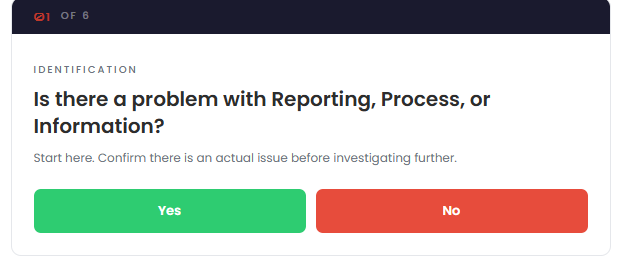
Start here. Confirm there is actually an issue. Sometimes complaints surface from memory ("it was broken last month") when the problem has already been resolved. Sometimes the frustration is real but it's about speed or preference, not a defect. If there's no current, concrete problem, close it out.
This is where most "system problems" die. A surprising number of reported issues come from people who worked around the system entirely. They used a spreadsheet, made a phone call, did it from memory. The system didn't fail — it was never given the chance.
This isn't about blaming people. It's about diagnosing accurately. If the system wasn't used, the fix is adoption and possibly training — not a system change.
If the system was used and it behaved correctly, the issue isn't a system defect. It might be a process gap, a communication failure, or an unrealistic expectation. But the system itself is fine.
This is the question people don't like asking. Nobody wants to admit they don't know how to use a tool they've had for eighteen months. But training gaps are normal, especially after go-live when things were moving fast and not everything stuck.
If the answer is no, the fix is training. Not a system change. Train them, have them use it, then reassess.
Some issues are real but rare. They show up once a quarter in an edge case. For those, a manual workaround is often the right answer. Spending $20,000 to automate something that happens four times a year and takes ten minutes each time is not a good investment.
Reserve system changes for issues that recur, that affect the core business, and that cause measurable pain when they happen.
If the issue is infrequent and immaterial, an ad hoc workaround is acceptable. Document it so everyone knows the workaround exists, and move on. Not every edge case needs a system fix.
If you can't accept a workaround — if the issue is too frequent, too costly, or too risky — then and only then do you have a genuine system fix on your hands. Log it, fix it, verify the fix.
The framework guards against two failures that I see constantly in SME operations:
The first is throwing technology at a people problem. New software won't help if the team doesn't use the current software. A better CRM won't fix follow-up if the real issue is that nobody has a defined follow-up process. An upgraded ERP won't improve reporting if the existing ERP could produce the reports — but nobody asked for them.
The second is tolerating broken systems because "that's just how it is." Some teams have lived with workarounds for so long they've stopped seeing them as problems. They spend forty minutes every Friday rebuilding a report that could be automated. They re-key data between two systems that could be integrated. When someone asks why, they shrug and say it's always been that way.
Both are expensive. The framework helps you tell the difference.
I use this framework with every client, in every project. It sits behind how I evaluate ERP pain points, how I scope automation work, and how I decide what to fix first. It's not complex. That's the point.